Chuyển đến nội dung chính

Continuing our Journey with the #StopDirtyPalmOil campaign

A few weeks ago, I blogged about a project my Year 4 class had started, inspired by the recent Greenpeace advert - There's a Rang-Tan in my Bedroom. To read that blog post, which includes original questions linked to the advert, please click the picture:


The response we received from the video the class created where they wrote in role as a helpless Orangutan, seeing their home destroyed was so positive and empowering.  Again you can read more about this by clicking the picture above. If you haven't yet seen the video, here it is:
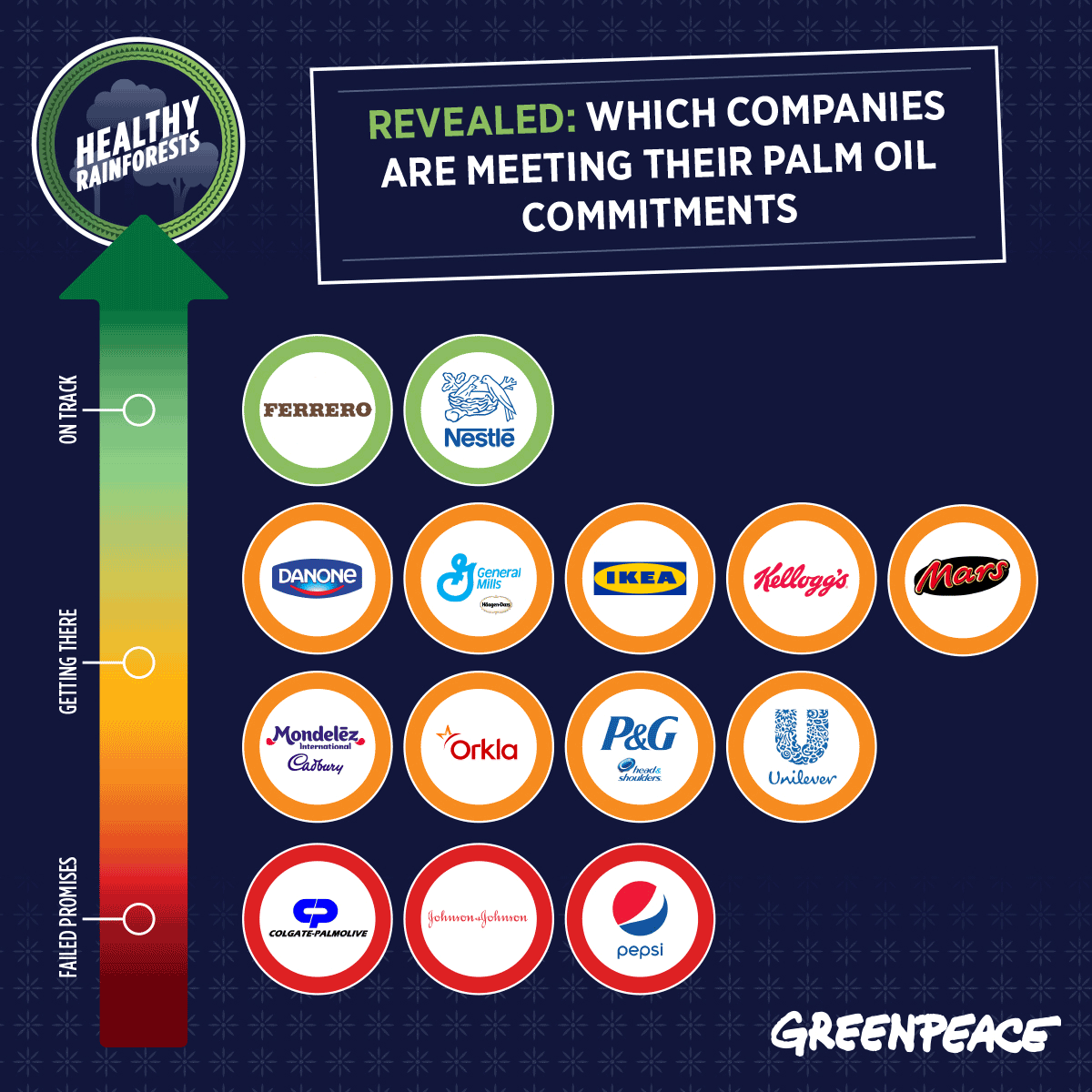

From the reaction to the video, my class were inspired to go further and investigate the issue more. We discovered this from Greenpeace, which identifies companies with links to Dirty Palm Oil:


According to Greenpeace, these companies made a promise to be clean of dirty palm oil by 2020. My pupils decided to write to these companies to provide a polite reminder and ensure they are on target to keep their promise. 

After drafting their letters, I gave quality oral feedback through our iPads, this is something I cover on all my CPD sessions and will also be demonstrating on my subscription page on facebook.


The pupils were then given the opportunity to transform their writing into a video using Adobe Spark Video. This is another example of the READWRITEPERFORM approach in action. These videos were then tweeted and emailed to all the companies identified in the above image. Here is an example from our pupils:


Please let my class know what you think by leaving a comment on this video on facebook.

So far, we've received a lot of replies from the companies. I can't wait to share them with my class as they'll see how their writing is making a difference:


We will keep you updated with this project as we continue to learn about it in class. 

Nhận xét

Popular Posts

Publishing Opinion Writing Using Apple Clips & PicEdu

Students in Mrs. Heringer's 2nd grade did a fantastic job publishing their opinion writing pieces using PicEdu, Apple Clips & Seesaw. The results are creative, engaging videos that tell their opinions and give voice to their stories. Keep reading to see how they did it! Mrs. Heringer's students worked on their opinion writing pieces and drafted their writing on paper. Students used a graphic organizer to organize their thoughts, using the Step Up to Writing method, then wrote finished drafts onto lined paper. Because students' writing was organized into four groups (first, next, then, last), we had them use the app PicEdu to create four illustrations for their stories. We allowed them to use web search, drawing, stickers or the camera to create their illustrations - our main focus was that students created illustrations that made sense with the words they wrote. Once illustrations were done, we showed students how to use the app Apple Clips to finish their projects. If...

Google Edu Infographic: How to Force a Copy of a Document

Can't see the image via email? Visit the blog here . Try it out! Click this link to take a copy of the file . This technique also works on other Google filetypes (Sheets and Slides). Original URL: https://docs.google.com/a/friedtechnology.com/document/d/1CqUbWOHedWr9WiLO7M4aM9IIDPple1HhDGSx23tzerA/edit?usp=sharing Edited URL (the Force Copy URL): https://docs.google.com/a/friedtechnology.com/document/d/1CqUbWOHedWr9WiLO7M4aM9IIDPple1HhDGSx23tzerA/copy

SolidWorks 2016 Crack Only Download

SolidWorks 2016 Crack Only for SP0/SP1/SP2/SP3 – Since the beta test phase of SOLIDWORKS is completed in 2016 and the obligation of secrecy has been lifted, it is Ow, time to share my new favorite features with you. Like every year, most of the functions on the basis of customer inquiries have been developed. It is also nice to see that functions on the basis of wishes by Cadmes customers were added. SolidWorks 2016 Patch, SolidWorks 2016 Serial Activation, SolidWorks 2016 KeyGen Crack. To install SolidWorks you need Administator account It’s strongly recommended to turn off Windows UAC If your antivirus software is not from the list recommended by SW developers ( http://www.solidworks.com/sw/support/AntiVirus_SW.html ) it’s strongly recommended to turn it off 1. DISCONNECT INTERNET!!! 2. Import the SolidWorksSerialNumbers2016.reg file as administrator to populate serial numbers for SolidWorks products. 3. Mount ISO DVD1 into virtual CD-drive and run “setup.exe” if will not start autom...